There may be a situation when you need to execute a block of code several number of times. In general, statements are executed sequentially: The first statement in a function is executed first, followed by the second, and so on.
Programming languages provide various control structures that allow for more complicated execution paths.
A loop statement allows us to execute a statement or group of statements multiple times and following is the general form of a loop statement in most of the programming languages −
Programming languages provide various control structures that allow for more complicated execution paths.
A loop statement allows us to execute a statement or group of statements multiple times and following is the general form of a loop statement in most of the programming languages −
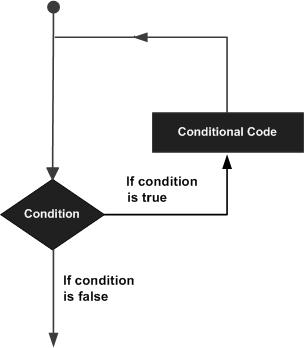
Java programming language provides the following types of loop to handle looping requirements. Click the following links to check their detail.
Description
1 while loop
Repeats a statement or group of statements while a given condition is true. It tests the condition before executing the loop body.
Repeats a statement or group of statements while a given condition is true. It tests the condition before executing the loop body.
2 for loop
Execute a sequence of statements multiple times and abbreviates the code that manages the loop variable.
3 do...while loop
Like a while statement, except that it tests the condition at the end of the loop body.
Loop Control Statements
Loop control statements change execution from its normal sequence. When execution leaves a scope, all automatic objects that were created in that scope are destroyed.
Java supports the following control statements. Click the following links to check their detail.
Sr.No.Control Statement & Description
1 break statement
Terminates the loop or switch statement and transfers execution to the statement immediately following the loop or switch.
2 continue statement
Causes the loop to skip the remainder of its body and immediately retest its condition prior to reiterating.
Enhanced for loop in Java
As of Java 5, the enhanced for loop was introduced. This is mainly used to traverse collection of elements including arrays.
Syntax
Following is the syntax of enhanced for loop −
Declaration − The newly declared block variable, is of a type compatible with the elements of the array you are accessing. The variable will be available within the for block and its value would be the same as the current array element.
Expression − This evaluates to the array you need to loop through. The expression can be an array variable or method call that returns an array.
Like a while statement, except that it tests the condition at the end of the loop body.
Loop Control Statements
Loop control statements change execution from its normal sequence. When execution leaves a scope, all automatic objects that were created in that scope are destroyed.
Java supports the following control statements. Click the following links to check their detail.
Sr.No.Control Statement & Description
1 break statement
Terminates the loop or switch statement and transfers execution to the statement immediately following the loop or switch.
2 continue statement
Causes the loop to skip the remainder of its body and immediately retest its condition prior to reiterating.
Enhanced for loop in Java
As of Java 5, the enhanced for loop was introduced. This is mainly used to traverse collection of elements including arrays.
Syntax
Following is the syntax of enhanced for loop −
for(declaration : expression) {
   // Statements
}
Declaration − The newly declared block variable, is of a type compatible with the elements of the array you are accessing. The variable will be available within the for block and its value would be the same as the current array element.
Expression − This evaluates to the array you need to loop through. The expression can be an array variable or method call that returns an array.
Example
public class Test {

   public static void main(String args[]) {
      int [] numbers = {10, 20, 30, 40, 50};

      for(int x : numbers ) {
         System.out.print( x );
         System.out.print(",");
      }
      System.out.print("\n");
      String [] names = {"James", "Larry", "Tom", "Lacy"};

      for( String name : names ) {
         System.out.print( name );
         System.out.print(",");
      }
   }
}
This will produce the following result − Output 10, 20, 30, 40, 50,
James, Larry, Tom, Lacy,
very nice blog and I just like it. Keep going.
ReplyDeleteJava Training in Bangalore
Java Course in Bangalore
Java Training in Madurai
Java Course in Madurai
Java Training in Coimbatore
Java Classes in Coimbatore
ReplyDeleteTruly well post! I gain more details from your post and I like more post, please continue blogging...
Oracle DBA Training in Chennai
Oracle DBA Course in Chennai
Spark Training in Chennai
Social Media Marketing Courses in Chennai
Excel Training in Chennai
Corporate Training in Chennai
Tableau Training in Chennai
Oracle Training in Chennai
Nice and clear explanation on loop control.
ReplyDeleteThanks,
https://www.flowerbrackets.com/do-while-loop-java/
I am reading your post from the beginning, it was so interesting to read & I feel thanks to you for posting such a good blog, keep updates regularly.
ReplyDeleteWeb Designing Course Training in Chennai | Web Designing Course Training in annanagar | Web Designing Course Training in omr | Web Designing Course Training in porur | Web Designing Course Training in tambaram | Web Designing Course Training in velachery